Back to Products

Featured
Bestseller
Expert Advisors
Sniper Gold EA MT5 (Unlimited) + SetFiles Review 2026 | Professional XAUUSD Forex Robot
$899.00
$10.00
98.89% OFFWhat you get
- Advanced Gold Trading Algorithm
- Fully Automated Trading
- Optimized for XAUUSD (Gold)
- Smart Market Analysis
- Advanced Risk Management
7-day refund support for valid technical issues.
Need help? Contact support via Telegram for setup help.
What is Sniper Gold EA MT5 (Unlimited) + SetFiles?
Overview
Sniper Gold EA MT5 (Unlimited) + SetFiles is a next-generation automated Forex Expert Advisor (EA) built specifically for trading XAUUSD (Gold) on the MetaTrader 5 (MT5) platform. Designed for traders seeking a reliable, intelligent, and fully automated trading solution, this EA combines advanced algorithmic analysis with disciplined risk management to identify high-probability trading opportunities in the highly volatile Gold market.
Whether you are a beginner looking to automate your trading or an experienced trader searching for a professional Gold trading robot, Sniper Gold EA MT5 provides a user-friendly and efficient solution. The EA continuously analyzes market conditions, detects potential entry and exit points, and executes trades automatically without emotional decision-making.
Unlike many high-risk Forex robots, Sniper Gold EA MT5 is designed to prioritize consistency and capital protection. It focuses on controlled trade execution and incorporates customizable money management settings, allowing traders to adjust risk levels based on their account size and trading objectives.
The included optimized SetFiles simplify the setup process, enabling users to install the EA and start trading with recommended configurations in just a few minutes. The software is fully compatible with the latest MetaTrader 5 builds and supports most MT5 brokers, including Standard, ECN, RAW Spread, and Hedging accounts.
For the best performance, it is recommended to run the EA on a low-latency Forex VPS with a reliable broker that offers fast execution and competitive spreads.
Why Choose Sniper Gold EA MT5?
Designed exclusively for XAUUSD (Gold) trading
Fully automated trading on MetaTrader 5
Intelligent algorithmic market analysis
Smart trade entry and exit management
Adjustable risk and money management settings
Compatible with Standard, ECN, and RAW Spread accounts
Optimized SetFiles included for quick installation
Supports the latest MT5 platform updates
Unlimited account usage with no licensing restrictions
Ideal for traders seeking consistent, automated Gold trading in 2026
Trading Strategy
Sniper Gold EA MT5 uses a data-driven trading strategy that evaluates live market conditions before executing trades. The algorithm aims to identify high-probability opportunities based on price action and technical market behavior while applying strict trade management rules to help reduce unnecessary exposure.
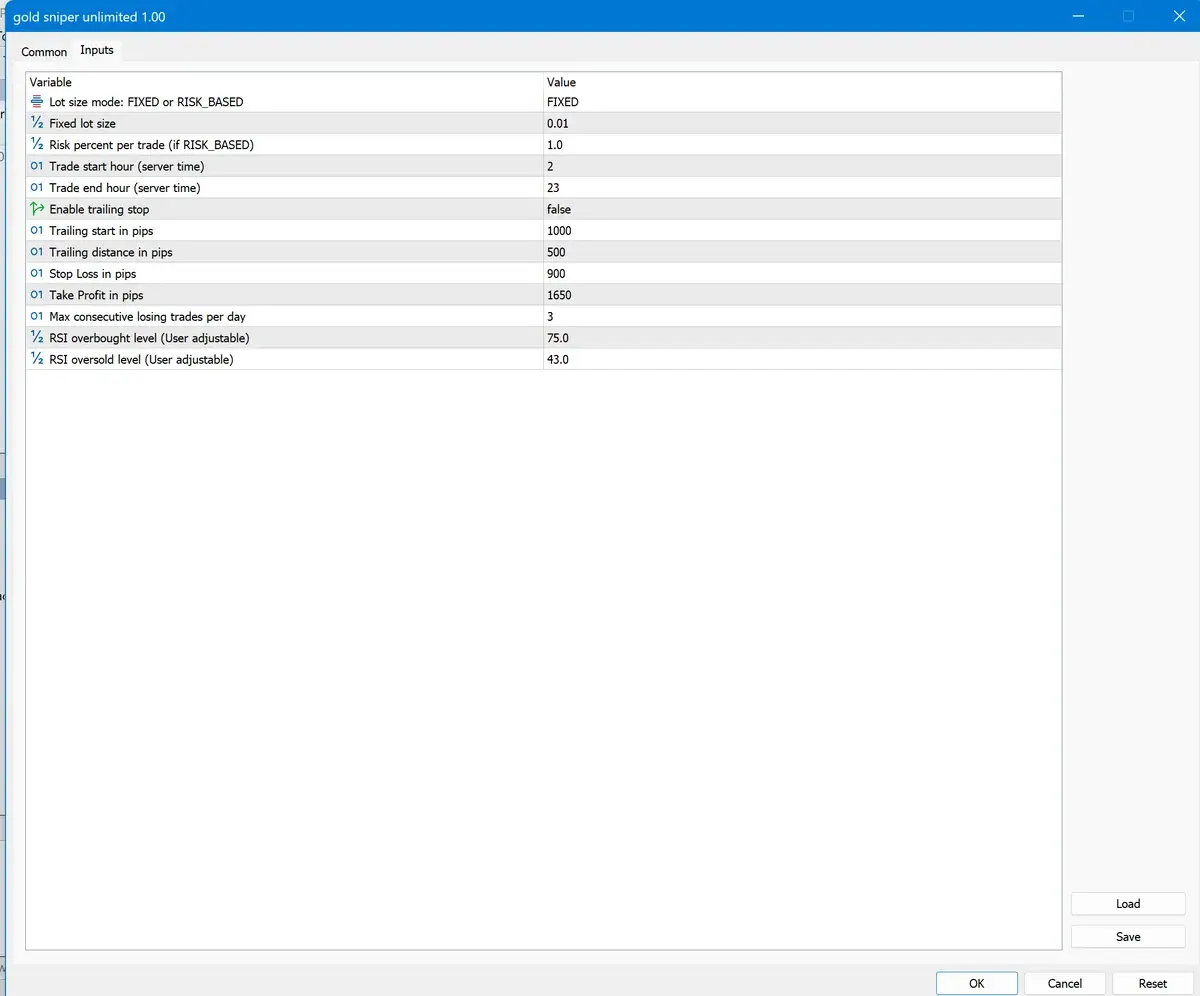
The EA continuously monitors market volatility, execution conditions, and trading opportunities to improve order quality and maintain stable automated performance. Its flexible settings allow traders to customize lot sizing, risk percentage, Stop Loss, and Take Profit according to their preferred trading style.
Trading Environment
For optimal performance, the following trading environment is recommended:
Platform: MetaTrader 5 (MT5)
Primary Symbol: XAUUSD (Gold)
Broker Type: ECN, RAW Spread, or Standard
Execution: Low-latency execution
VPS: Recommended for uninterrupted 24/7 operation
Leverage: 1:100 or higher (depending on your broker)
Money Management: Adjustable to suit different account sizes
Sniper Gold EA MT5 (Unlimited) + SetFiles is a next-generation automated Forex Expert Advisor (EA) built specifically for trading XAUUSD (Gold) on the MetaTrader 5 (MT5) platform. Designed for traders seeking a reliable, intelligent, and fully automated trading solution, this EA combines advanced algorithmic analysis with disciplined risk management to identify high-probability trading opportunities in the highly volatile Gold market.
Whether you are a beginner looking to automate your trading or an experienced trader searching for a professional Gold trading robot, Sniper Gold EA MT5 provides a user-friendly and efficient solution. The EA continuously analyzes market conditions, detects potential entry and exit points, and executes trades automatically without emotional decision-making.
Unlike many high-risk Forex robots, Sniper Gold EA MT5 is designed to prioritize consistency and capital protection. It focuses on controlled trade execution and incorporates customizable money management settings, allowing traders to adjust risk levels based on their account size and trading objectives.
The included optimized SetFiles simplify the setup process, enabling users to install the EA and start trading with recommended configurations in just a few minutes. The software is fully compatible with the latest MetaTrader 5 builds and supports most MT5 brokers, including Standard, ECN, RAW Spread, and Hedging accounts.
For the best performance, it is recommended to run the EA on a low-latency Forex VPS with a reliable broker that offers fast execution and competitive spreads.
Why Choose Sniper Gold EA MT5?
Designed exclusively for XAUUSD (Gold) trading
Fully automated trading on MetaTrader 5
Intelligent algorithmic market analysis
Smart trade entry and exit management
Adjustable risk and money management settings
Compatible with Standard, ECN, and RAW Spread accounts
Optimized SetFiles included for quick installation
Supports the latest MT5 platform updates
Unlimited account usage with no licensing restrictions
Ideal for traders seeking consistent, automated Gold trading in 2026
Trading Strategy
Sniper Gold EA MT5 uses a data-driven trading strategy that evaluates live market conditions before executing trades. The algorithm aims to identify high-probability opportunities based on price action and technical market behavior while applying strict trade management rules to help reduce unnecessary exposure.
The EA continuously monitors market volatility, execution conditions, and trading opportunities to improve order quality and maintain stable automated performance. Its flexible settings allow traders to customize lot sizing, risk percentage, Stop Loss, and Take Profit according to their preferred trading style.
Trading Environment
For optimal performance, the following trading environment is recommended:
Platform: MetaTrader 5 (MT5)
Primary Symbol: XAUUSD (Gold)
Broker Type: ECN, RAW Spread, or Standard
Execution: Low-latency execution
VPS: Recommended for uninterrupted 24/7 operation
Leverage: 1:100 or higher (depending on your broker)
Money Management: Adjustable to suit different account sizes
Recommended Trading Currency Pairs
🥇 Primary Recommended Symbol
XAUUSD (Gold) – Highly Recommended ⭐⭐⭐⭐⭐
Sniper Gold EA MT5 is primarily designed and optimized for trading XAUUSD (Gold) on the MetaTrader 5 platform. The trading algorithm is built to analyze Gold's volatility, momentum, and price action to identify high-probability trading opportunities.
Recommended Timeframes:
M5 (Recommended)
M15 (Recommended)
Recommended Broker Type:
ECN Account
RAW Spread Account
Standard MT5 Account
Compatible Trading Instruments
While the EA is optimized for XAUUSD, some traders may choose to test it on other highly liquid instruments using a demo account. Performance on symbols other than XAUUSD may differ from the primary configuration.
Potential instruments for evaluation include:
XAUUSD (Gold) ⭐ Recommended
EURUSD
GBPUSD
USDJPY
US30 (Broker dependent)
NAS100 (Broker dependent)
Note: These additional symbols are not guaranteed to perform the same as XAUUSD. Always conduct forward testing on a demo account before trading live.
Recommended Trading Environment
Platform: MetaTrader 5 (MT5)
Primary Symbol: XAUUSD (Gold)
Recommended Timeframe: M5 or M15
Execution Type: ECN / RAW Spread
Minimum Deposit: $500 or higher (Recommended: $1,000+)
Recommended Leverage: 1:100 or higher (subject to your broker's offering)
Trading Session: London and New York market sessions
VPS: Recommended for uninterrupted 24/7 automated trading
XAUUSD (Gold) – Highly Recommended ⭐⭐⭐⭐⭐
Sniper Gold EA MT5 is primarily designed and optimized for trading XAUUSD (Gold) on the MetaTrader 5 platform. The trading algorithm is built to analyze Gold's volatility, momentum, and price action to identify high-probability trading opportunities.
Recommended Timeframes:
M5 (Recommended)
M15 (Recommended)
Recommended Broker Type:
ECN Account
RAW Spread Account
Standard MT5 Account
Compatible Trading Instruments
While the EA is optimized for XAUUSD, some traders may choose to test it on other highly liquid instruments using a demo account. Performance on symbols other than XAUUSD may differ from the primary configuration.
Potential instruments for evaluation include:
XAUUSD (Gold) ⭐ Recommended
EURUSD
GBPUSD
USDJPY
US30 (Broker dependent)
NAS100 (Broker dependent)
Note: These additional symbols are not guaranteed to perform the same as XAUUSD. Always conduct forward testing on a demo account before trading live.
Recommended Trading Environment
Platform: MetaTrader 5 (MT5)
Primary Symbol: XAUUSD (Gold)
Recommended Timeframe: M5 or M15
Execution Type: ECN / RAW Spread
Minimum Deposit: $500 or higher (Recommended: $1,000+)
Recommended Leverage: 1:100 or higher (subject to your broker's offering)
Trading Session: London and New York market sessions
VPS: Recommended for uninterrupted 24/7 automated trading
Sniper Gold EA MT5 (Unlimited) + SetFiles Features
Advanced Gold Trading Algorithm
Fully Automated Trading
Optimized for XAUUSD (Gold)
Smart Market Analysis
Advanced Risk Management
Intelligent Trade Execution
Spread Protection Filter
Flexible Money Management
Multi-Broker Compatibility
VPS Compatible
Optimized SetFiles Included
Latest MT5 Build Support
Easy Installation
Stable Trading Logic
Sniper Gold EA MT5 (Unlimited) + SetFiles – Best Settings
To achieve stable and efficient automated trading, it is recommended to use the optimized SetFiles included with Sniper Gold EA MT5. These settings are designed to provide a balanced approach to risk management and trade execution. Before trading on a live account, always test the EA on a demo account to ensure the configuration matches your broker's trading conditions.
✅ Recommended Trading Configuration
Setting Recommended Value
Platform MetaTrader 5 (MT5)
Trading Symbol XAUUSD (Gold)
Recommended Timeframe M5 (Primary), M15 (Alternative)
Account Type ECN, RAW Spread, or Standard
Minimum Deposit $500 (Recommended: $1,000+)
Recommended Leverage 1:100 or Higher
Execution Mode Market Execution
Money Management Auto Lot or Manual Lot
Risk Per Trade 1%–2% of Account Balance
VPS Highly Recommended
Trading Hours 24/5 (Forex Market Hours)
AutoTrading Enabled
✅ Recommended Trading Configuration
Setting Recommended Value
Platform MetaTrader 5 (MT5)
Trading Symbol XAUUSD (Gold)
Recommended Timeframe M5 (Primary), M15 (Alternative)
Account Type ECN, RAW Spread, or Standard
Minimum Deposit $500 (Recommended: $1,000+)
Recommended Leverage 1:100 or Higher
Execution Mode Market Execution
Money Management Auto Lot or Manual Lot
Risk Per Trade 1%–2% of Account Balance
VPS Highly Recommended
Trading Hours 24/5 (Forex Market Hours)
AutoTrading Enabled
Instructions for Installing Sniper Gold EA MT5 (Unlimited) + SetFiles
Installing Sniper Gold EA MT5 is quick and straightforward. Follow the steps below to correctly install the Expert Advisor (EA) and begin automated trading on the MetaTrader 5 platform.
Step 1: Download the Product
After completing your purchase, download the Sniper Gold EA MT5 (Unlimited) + SetFiles package from your account.
The download package typically includes:
Sniper Gold EA MT5 (.ex5)
Optimized SetFiles (.set)
User Guide (if included)
Product Documentation
Step 2: Install the Expert Advisor
Open MetaTrader 5 (MT5).
Click File → Open Data Folder.
Open the following folder:
MQL5 → Experts
Copy the Sniper Gold EA MT5.ex5 file into the Experts folder.
Step 3: Install the SetFiles
Return to the MQL5 folder.
Open:
MQL5 → Profiles → Tester
or the folder specified for your MT5 installation if you use a different location for preset files.
Copy all included .set files into the appropriate presets folder.
Step 4: Restart MetaTrader 5
Close MetaTrader 5 and reopen it.
Alternatively:
Right-click Expert Advisors in the Navigator window.
Select Refresh.
The EA should now appear in your Expert Advisors list.
Step 5: Open the Trading Chart
Open the recommended trading chart:
Symbol: XAUUSD (Gold)
Timeframe: M5 (Recommended) or M15 (Alternative)
Step 6: Attach the EA
Drag Sniper Gold EA MT5 from the Navigator onto the chart.
In the settings window:
Enable Allow Algo Trading (or Allow Automated Trading, depending on your MT5 version).
Enable DLL imports only if the EA documentation specifically requires them.
Click OK.
Step 7: Load the Optimized SetFile
Open the EA Inputs tab.
Click Load.
Select the recommended .set file included with your purchase.
Click OK.
Step 8: Enable Auto Trading
Click the AutoTrading button on the MetaTrader 5 toolbar.
A smiling icon (or the platform's equivalent active EA indicator) should appear on the chart, indicating that automated trading is enabled.
Recommended Trading Environment
Setting Recommendation
Platform MetaTrader 5 (MT5)
Symbol XAUUSD (Gold)
Timeframe M5 (Recommended)
Account Type ECN, RAW Spread, or Standard
Minimum Deposit $500+ (Recommended: $1,000+)
Leverage 1:100 or Higher
VPS Recommended
Auto Trading Enabled
Best Practices
Use the included optimized SetFiles.
Run the EA on a stable Forex VPS for 24/7 operation.
Use a reliable MT5 broker with low spreads and fast execution.
Test the EA on a demo account before trading live.
Keep your MetaTrader 5 platform updated to the latest version.
Monitor your account regularly and adjust risk settings according to your trading plan.
Troubleshooting
EA is not trading
Confirm AutoTrading is enabled.
Verify the EA is attached to the recommended chart and timeframe.
Check the Experts and Journal tabs in MT5 for any error messages.
EA does not appear in Navigator
Make sure the .ex5 file is in the MQL5 → Experts folder.
Restart MT5 or refresh the Navigator.
SetFile won't load
Ensure the .set file is in the correct preset location and matches the EA version you are using.
Step 1: Download the Product
After completing your purchase, download the Sniper Gold EA MT5 (Unlimited) + SetFiles package from your account.
The download package typically includes:
Sniper Gold EA MT5 (.ex5)
Optimized SetFiles (.set)
User Guide (if included)
Product Documentation
Step 2: Install the Expert Advisor
Open MetaTrader 5 (MT5).
Click File → Open Data Folder.
Open the following folder:
MQL5 → Experts
Copy the Sniper Gold EA MT5.ex5 file into the Experts folder.
Step 3: Install the SetFiles
Return to the MQL5 folder.
Open:
MQL5 → Profiles → Tester
or the folder specified for your MT5 installation if you use a different location for preset files.
Copy all included .set files into the appropriate presets folder.
Step 4: Restart MetaTrader 5
Close MetaTrader 5 and reopen it.
Alternatively:
Right-click Expert Advisors in the Navigator window.
Select Refresh.
The EA should now appear in your Expert Advisors list.
Step 5: Open the Trading Chart
Open the recommended trading chart:
Symbol: XAUUSD (Gold)
Timeframe: M5 (Recommended) or M15 (Alternative)
Step 6: Attach the EA
Drag Sniper Gold EA MT5 from the Navigator onto the chart.
In the settings window:
Enable Allow Algo Trading (or Allow Automated Trading, depending on your MT5 version).
Enable DLL imports only if the EA documentation specifically requires them.
Click OK.
Step 7: Load the Optimized SetFile
Open the EA Inputs tab.
Click Load.
Select the recommended .set file included with your purchase.
Click OK.
Step 8: Enable Auto Trading
Click the AutoTrading button on the MetaTrader 5 toolbar.
A smiling icon (or the platform's equivalent active EA indicator) should appear on the chart, indicating that automated trading is enabled.
Recommended Trading Environment
Setting Recommendation
Platform MetaTrader 5 (MT5)
Symbol XAUUSD (Gold)
Timeframe M5 (Recommended)
Account Type ECN, RAW Spread, or Standard
Minimum Deposit $500+ (Recommended: $1,000+)
Leverage 1:100 or Higher
VPS Recommended
Auto Trading Enabled
Best Practices
Use the included optimized SetFiles.
Run the EA on a stable Forex VPS for 24/7 operation.
Use a reliable MT5 broker with low spreads and fast execution.
Test the EA on a demo account before trading live.
Keep your MetaTrader 5 platform updated to the latest version.
Monitor your account regularly and adjust risk settings according to your trading plan.
Troubleshooting
EA is not trading
Confirm AutoTrading is enabled.
Verify the EA is attached to the recommended chart and timeframe.
Check the Experts and Journal tabs in MT5 for any error messages.
EA does not appear in Navigator
Make sure the .ex5 file is in the MQL5 → Experts folder.
Restart MT5 or refresh the Navigator.
SetFile won't load
Ensure the .set file is in the correct preset location and matches the EA version you are using.
Who Should Use Sniper Gold EA MT5 (Unlimited) + SetFiles?
Sniper Gold EA MT5 (Unlimited) + SetFiles is designed for traders who want to automate their Gold trading strategy on the MetaTrader 5 platform. Whether you are new to automated trading or an experienced Forex trader, this Expert Advisor provides flexible features that can suit different trading styles and experience levels.
✅ Beginner Forex Traders
If you are new to Forex or Gold trading, Sniper Gold EA MT5 offers a straightforward way to explore automated trading. With the included optimized SetFiles and simple installation process, beginners can start using the EA with minimal setup while learning how Expert Advisors operate.
✅ Experienced Forex Traders
Professional traders can integrate Sniper Gold EA MT5 into their trading portfolio to automate trade execution, reduce emotional decision-making, and save time. The adjustable risk management settings allow experienced users to tailor the EA to their own trading plans.
✅ XAUUSD (Gold) Traders
This EA is best suited for traders who primarily focus on XAUUSD (Gold). Its strategy is designed around the characteristics of the Gold market, making it a suitable option for those seeking an automated Gold trading solution.
✅ Automated Trading Enthusiasts
If you prefer automated trading over manual chart analysis, Sniper Gold EA MT5 can monitor the market and execute trades according to its programmed strategy while you focus on other tasks.
✅ Busy Professionals
Traders with limited time to monitor the markets throughout the day may benefit from an Expert Advisor that can operate automatically during market hours, provided the platform remains online.
✅ VPS Users
For traders running their trading platforms on a Forex VPS, Sniper Gold EA MT5 is compatible with continuous 24/5 automated operation, helping maintain stable execution when the VPS is properly configured.
✅ Traders Seeking Flexible Risk Management
The EA includes configurable money management options, allowing users to adjust position sizing and risk parameters according to their account size and personal risk tolerance.
Recommended For
✔ Beginner MT5 traders learning automated trading
✔ Intermediate and advanced Forex traders
✔ XAUUSD (Gold) traders
✔ MetaTrader 5 users
✔ Traders using ECN, RAW Spread, or Standard accounts
✔ Traders who use a Forex VPS
✔ Users looking for a fully automated Gold trading solution
✔ Traders who prefer configurable risk management
Not Ideal For
Sniper Gold EA MT5 may not be the best choice for:
Traders who only use the MetaTrader 4 (MT4) platform.
Traders who prefer fully manual trading without Expert Advisors.
Users who are unwilling to monitor their automated trading setup or manage trading risk.
Traders expecting guaranteed profits or risk-free trading, as all financial markets involve risk.
✅ Beginner Forex Traders
If you are new to Forex or Gold trading, Sniper Gold EA MT5 offers a straightforward way to explore automated trading. With the included optimized SetFiles and simple installation process, beginners can start using the EA with minimal setup while learning how Expert Advisors operate.
✅ Experienced Forex Traders
Professional traders can integrate Sniper Gold EA MT5 into their trading portfolio to automate trade execution, reduce emotional decision-making, and save time. The adjustable risk management settings allow experienced users to tailor the EA to their own trading plans.
✅ XAUUSD (Gold) Traders
This EA is best suited for traders who primarily focus on XAUUSD (Gold). Its strategy is designed around the characteristics of the Gold market, making it a suitable option for those seeking an automated Gold trading solution.
✅ Automated Trading Enthusiasts
If you prefer automated trading over manual chart analysis, Sniper Gold EA MT5 can monitor the market and execute trades according to its programmed strategy while you focus on other tasks.
✅ Busy Professionals
Traders with limited time to monitor the markets throughout the day may benefit from an Expert Advisor that can operate automatically during market hours, provided the platform remains online.
✅ VPS Users
For traders running their trading platforms on a Forex VPS, Sniper Gold EA MT5 is compatible with continuous 24/5 automated operation, helping maintain stable execution when the VPS is properly configured.
✅ Traders Seeking Flexible Risk Management
The EA includes configurable money management options, allowing users to adjust position sizing and risk parameters according to their account size and personal risk tolerance.
Recommended For
✔ Beginner MT5 traders learning automated trading
✔ Intermediate and advanced Forex traders
✔ XAUUSD (Gold) traders
✔ MetaTrader 5 users
✔ Traders using ECN, RAW Spread, or Standard accounts
✔ Traders who use a Forex VPS
✔ Users looking for a fully automated Gold trading solution
✔ Traders who prefer configurable risk management
Not Ideal For
Sniper Gold EA MT5 may not be the best choice for:
Traders who only use the MetaTrader 4 (MT4) platform.
Traders who prefer fully manual trading without Expert Advisors.
Users who are unwilling to monitor their automated trading setup or manage trading risk.
Traders expecting guaranteed profits or risk-free trading, as all financial markets involve risk.
Download Sniper Gold EA MT5 (Unlimited) + SetFiles
Sniper Gold EA MT5Pros and Cons
Pros
Designed for XAUUSD Gold Trading
Fully Automated Trading System
Advanced Trading Algorithm
MT5 Build Compatibility
Time-Saving Solution
Suitable for Different Account Types
Suitable for Different Account Types
Customizable Settings
Backtesting Support
Cons
Gold Trading Has High Volatility Risk
Requires Proper Broker Conditions
No Guaranteed Profits
Needs Monitoring
VPS Recommended for 24/7 Trading
May Need Optimization Over Time
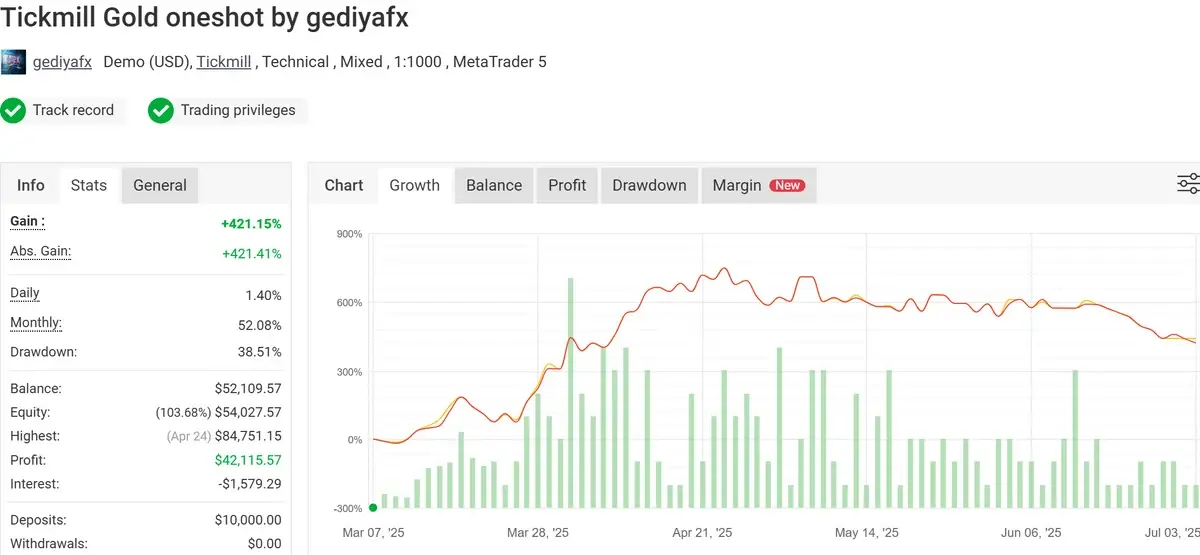
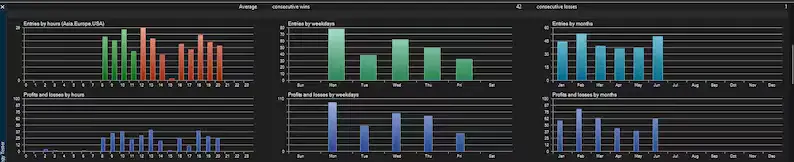
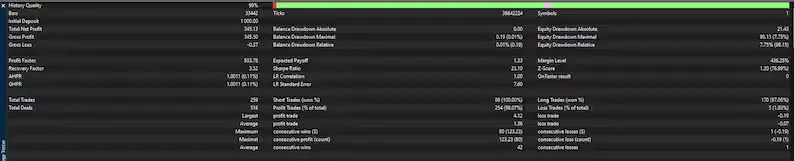
Backtest Results
Sniper Gold EA MT5 is a professional automated Forex Expert Advisor designed for XAUUSD Gold trading on the MetaTrader 5 platform. It uses advanced trading algorithms, smart market analysis, and automated trade management to help traders execute gold trading strategies with speed and precision. Suitable for beginners and experienced traders looking for a fully automated MT5 gold trading solution.
Final Verdict – Is Sniper Gold EA MT5 (Unlimited) + SetFiles Worth It?
Sniper Gold EA MT5 is a powerful automated trading solution designed for traders who want to automate their XAUUSD Gold trading on MetaTrader 5. With smart analysis, automated execution, and customizable risk settings, it provides a convenient way to trade without constant chart monitoring.
While the EA offers advanced features and can help improve trading efficiency, users should remember that no Forex robot can guarantee profits. Proper backtesting, a reliable broker, suitable risk management, and regular performance monitoring are essential for long-term success.
While the EA offers advanced features and can help improve trading efficiency, users should remember that no Forex robot can guarantee profits. Proper backtesting, a reliable broker, suitable risk management, and regular performance monitoring are essential for long-term success.
Conclusion
Sniper Gold EA MT5 is a professional automated trading tool built for traders who want to simplify their XAUUSD Gold trading experience on the MetaTrader 5 platform. With automated trade execution, smart market analysis, and customizable settings, it provides a convenient solution for both beginners and experienced traders.
Although the EA can help save time and improve trading efficiency, successful results depend on proper setup, broker conditions, risk management, and continuous performance evaluation. Traders should always test the EA on a demo account before moving to live trading.
Overall, Sniper Gold EA MT5 is a reliable choice for traders seeking an advanced Gold trading automation system with MT5 compatibility and professional trading features.
Although the EA can help save time and improve trading efficiency, successful results depend on proper setup, broker conditions, risk management, and continuous performance evaluation. Traders should always test the EA on a demo account before moving to live trading.
Overall, Sniper Gold EA MT5 is a reliable choice for traders seeking an advanced Gold trading automation system with MT5 compatibility and professional trading features.
What's Included
File Size
55.6KB
File Type
ZIP
Downloads
339
Login to add your review.
fader@gmail.com
Aug 04, 2026
Sniper Gold EA MT5 has made my XAUUSD trading process much easier. The automated entries and trade management features save a lot of time, and the setup was simple on my MetaTrader 5 platform. A useful tool for traders who prefer automated gold trading.
juacsan@gmail.com
Aug 04, 2026
I like the flexibility of the settings and the ability to customize risk parameters. After testing it properly, the EA performed well with my broker conditions. It is a great option for traders looking for an automated gold trading solution
lusiya@gmail.com
Aug 04, 2026
The installation process was straightforward, and the EA works smoothly on MT5. It helps reduce manual chart monitoring and provides a structured approach to XAUUSD trading
Sniper Gold EA MT5 is an automated Forex Expert Advisor designed for XAUUSD (Gold) trading on the MetaTrader 5 platform. It uses automated trading algorithms to analyze market conditions and manage trades.
The EA is designed for MetaTrader 5 (MT5) and works with compatible MT5 brokers.
The recommended trading instrument is:
✅ XAUUSD (Gold)
Yes. Once installed and configured correctly, the EA can automatically analyze the market, open trades, and manage positions according to its strategy settings.
No. Sniper Gold EA MT5 is designed for traders without coding experience. Users only need basic MetaTrader 5 knowledge for installation and setup.
The EA can work with many MT5 brokers, but performance may depend on broker conditions such as spread, execution speed, and server quality. An ECN or low-spread broker is generally recommended.
A VPS is not mandatory, but it is recommended for traders who want stable 24/7 operation and reduced connection interruptions.
Yes. You can use the MT5 Strategy Tester and a demo account to test performance and optimize settings before using a live account.
No. No Expert Advisor can guarantee profits. Trading results depend on market conditions, broker environment, settings, and proper risk management.
The recommended deposit depends on the user's risk settings, lot size, and broker conditions. Always start with proper risk management and test with a demo account first.
Yes. Beginners can use it after learning basic MT5 installation and trading concepts. Proper testing and understanding of risk management are recommended.
Installation usually involves:
Open MetaTrader 5
Copy the EA file into the MQL5 → Experts folder
Restart MT5
Attach the EA to the XAUUSD chart
Enable Algo Trading
Configure your preferred settings
Yes, it can be used on live MT5 accounts after proper testing and configuration. Always evaluate performance before using real funds.
The recommended timeframe depends on the EA version and strategy settings. Users should follow the included settings file or test the best-performing timeframe for their broker conditions.
Sniper Gold EA MT5 can be used as an automated trading tool, but traders should regularly monitor performance and adjust settings according to changing market conditions.